Take-Off by WEQS · Measurement Software for Windows
Measure off the drawing. Straight into Excel.
Take-Off by WEQS is on-screen measurement software built by a practising quantity surveyor, for quantity surveyors. Open a PDF or a CAD drawing, trace what you need, and take the quantities out as a spreadsheet — areas, lengths, counts and angles, grouped the way a bill is written.
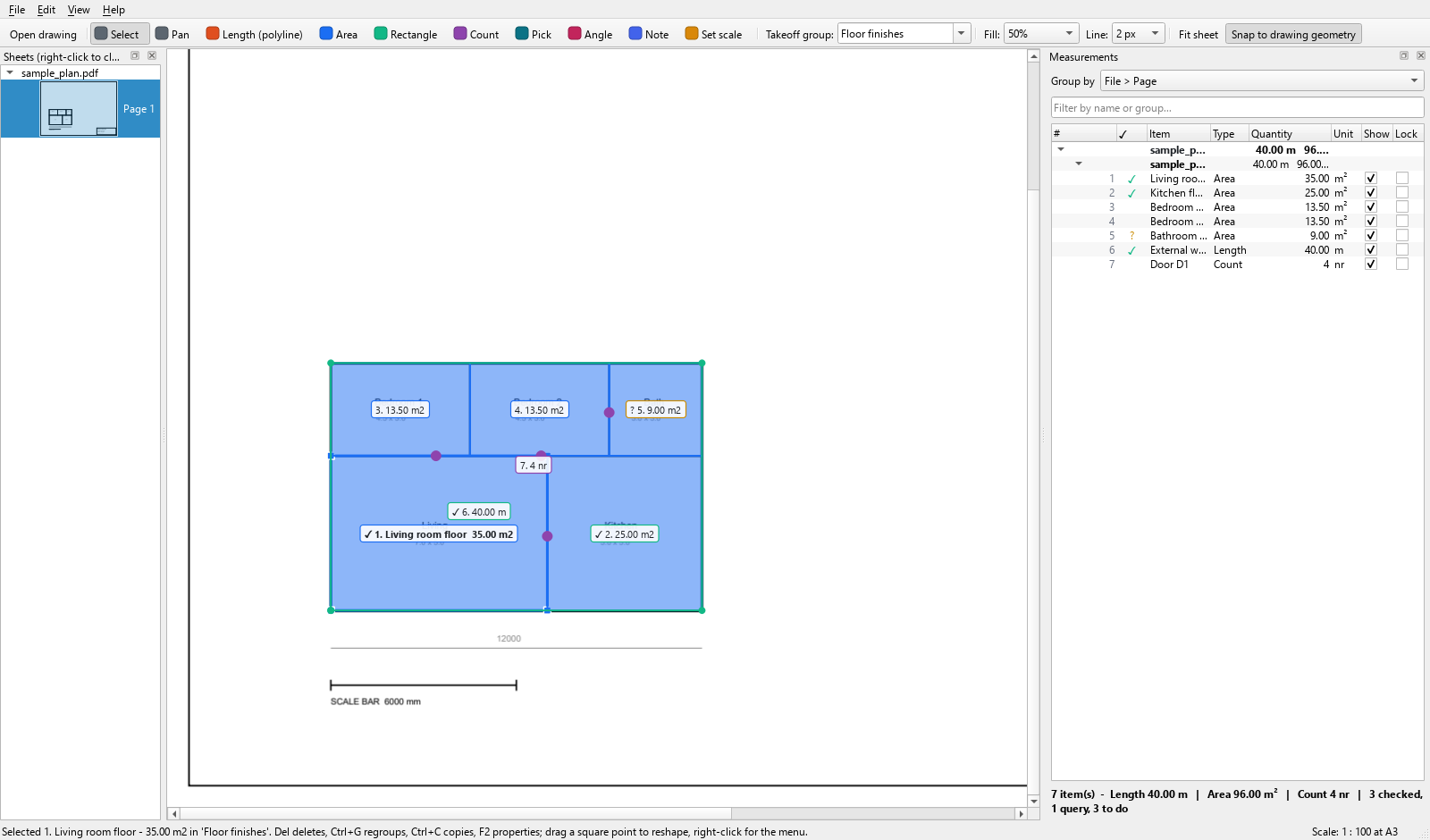
What It Does
Everything a take-off needs, and nothing that gets in the way.
PDF and CAD, side by side
Open PDF drawings and CAD files (DWG, DXF and DWFx) in the same job. Drag them onto the window, or open a whole set at once. Every sheet keeps its own scale.
Area, length, count, angle
Square metres, running metres, numbers of items, and angles in degrees. Trace as many points as the shape needs — a wall that turns six corners is one measurement, not six.
Pick an outline in one click
On CAD drawings and vector PDFs, click a line or a room outline that is already in the drawing and the whole path is measured at once — no tracing corner by corner, and none of the clicking error that comes with it.
Five ways to set the scale
From a distance you measure on the drawing, from a plot ratio, from CAD units, typed in by hand, or corrected from a reading — “it measures 4.30, the plan says 4.50”. Until a sheet is scaled, its quantities read zero in red rather than a plausible wrong number.
Grouped the way a bill is written
Put every marking into a take-off group — floor finishes, walls, doors — with its own colour and its own running total. Each item keeps a permanent reference number that is never reused.
Checked, queried, done
Tick each quantity off as you check it, or flag it as a query. The list keeps score: 12 checked, 3 query, 5 to do. Nothing about the figures changes — it is a note to yourself.
Out to Excel
Export to Excel or CSV: group, item, type, quantity, unit and perimeter, with totals per group. Or copy selected rows straight to the clipboard and paste them into the sheet you already use.
Undo anything
Sixty steps of undo covering every action that changes a take-off — tracing, deleting, moving, regrouping, rescaling, even closing a drawing. The status bar names what it undid.
One file, drawings included
Save the whole job — markings, groups, scales and the drawings themselves — as a single file that opens on any machine. Nothing to send alongside it, nothing to relink.
Every quantity is measured from the drawing’s own coordinates. Nothing is estimated, and nothing is guessed from a picture. A figure you can trace back to its source is what makes a bill defensible when a claim is disputed — the same principle this practice measures by.
How It Works
Drawing to spreadsheet in four steps.
| No. | Step | What you do |
|---|---|---|
| 01 | Open | Drag the PDF or CAD drawing onto the window. Multi-page sets open as a list of sheets with a preview of each. |
| 02 | Scale | Set the sheet scale once — from a printed dimension, a plot ratio, or the CAD units, which are usually detected for you. |
| 03 | Measure | Trace areas, lengths and counts, or pick outlines already in the drawing. Each one goes into a take-off group with its own colour and total. |
| 04 | Export | Send the lot to Excel, or copy the rows you want and paste them into your own measurement sheet. |
The user manual walks through all four steps with screenshots. It takes about ten minutes to read, or download it as a PDF.
What You Need
Runs on your own machine, offline.
| Operating system | Windows 10 or Windows 11, 64-bit. |
| Installation | A normal Windows installer, no administrator rights needed. Updates are announced in the program and installed the same way. |
| Internet | Not needed to measure. Your drawings and quantities never leave your machine — there is no cloud account and nothing is uploaded. |
| Drawing formats | PDF (including multi-page sets), DXF, DWG and DWFx. DWG is converted through the free ODA File Converter, which you install once; DWFx opens directly. The older binary DWF is not supported. |
| Scanned drawings | Measurable by tracing, once you set the scale from a printed dimension. Click-an-outline needs a drawing with real geometry in it. |
| Export | Excel (.xlsx) and CSV. No Excel licence required to produce the file. |
Pricing
One subscription, per seat.
Free trial
Free
1 month (30 days), every feature
- The complete software, nothing held back
- Your own drawings, your own jobs
- No card, no account
- Everything you measure stays yours
First 3 months
USD 9.90RM 39.90
per seat, for the first three months in total
- Starts when your trial ends
- All updates while subscribed
- WhatsApp and email support from a practising QS
- Cancel any time
Monthly
USD 9.90RM 39.90
per seat, per month, from the fourth month
- One seat, one machine — moving is one message
- All updates while subscribed
- Cancel any time
Annual
USD 99RM 399
per seat, per year — 17% less than twelve months
- Everything in the monthly plan
- One payment a year
- Price held for the term
How subscribing works
- Install the trial and use it on a real job.
- When you are ready, open Help → Licence in the program and copy the machine id (32 characters).
- Click Subscribe on the plan you want. You pay by card on Stripe's secure page — in RM if you are in Malaysia, USD elsewhere — tick the terms and paste the machine id. On the first-three-months plan the code FIRST3 is already filled in.
- Your licence key is emailed within one working day (and on WhatsApp if you gave a number). Paste it into the same Licence window and click Activate. A seat is one machine; moving to a new machine is one message.
By subscribing you agree to the Terms of Sale and Licence. All sales are final — the free trial is there so you can decide first — and checking the quantities you measure stays your responsibility.
Already subscribed? Change your card, download receipts or cancel in the subscription portal (sign in with the email you paid with). Prefer bank transfer or WhatsApp? Message us with your machine id.
If the subscription lapses, your work is not held hostage. The software keeps opening every job you have measured, and keeps saving and exporting them. What stops is measuring something new. A take-off belongs to the surveyor who measured it.
Questions
The things people ask first.
Do my drawings get uploaded anywhere?
No. The software runs entirely on your own machine and needs no internet connection to measure. Drawings, quantities and project files stay where you put them.
Can it open DWG?
Yes. DWG files are converted to DXF through the ODA File Converter, a free download you install once. DXF, DWFx and PDF open directly.
What about scanned drawings?
You can measure them by tracing, once the scale is set from a printed dimension on the sheet. What a scan cannot do is click-an-outline, because a scanned page holds a picture rather than geometry — and the software tells you so rather than pretending otherwise.
Will the quantities match my own measurement sheet?
They are measured from the drawing’s own coordinates through the scale you set, so they should. The export gives group, item, type, quantity, unit and perimeter, and you can copy any selection of rows straight into the spreadsheet you already work in.
Does it replace a quantity surveyor?
No, and it is not meant to. It is the tool a surveyor uses to measure faster and check more easily. The judgement — what to measure, how to describe it, what it should be worth — is still the job. If you would rather hand the whole take-off over, that is the service this practice provides.
Who built it?
WE Quantity Surveyor — a BQSM-registered Quantity Surveyor with 20 years in practice and over 2,000 take-offs completed. It was built to do our own measuring, which is why it works the way a take-off actually works.
Free Trial
Try it on your own drawings.
Thirty days, everything on.
Leave your name and email and the download starts on the next page — no waiting for a reply. No card, no account, and nothing held back: try it on a real job, not a demo file.